Pick, Convert & Propose Time Slots in Seconds.
for Google Calendar
∞
time slots to pick.
> 48 hours of time savings*
*per year, assuming two uses per day for replacing a 4-min manual process
26
time zones to convert into.
Keep scheduling human.
Propose time slots from Google Calendar — clean, personal, no links.
Includes time formatting & conversion.
Slot2Text at a glance
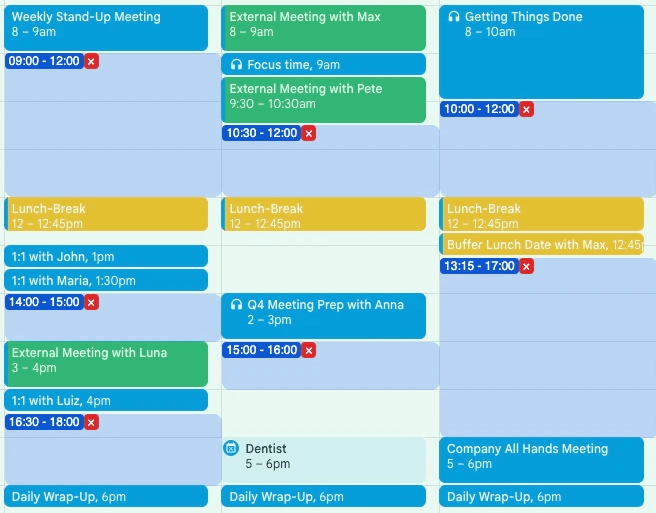
Pick availabilities in seconds.
As simple as it could be.
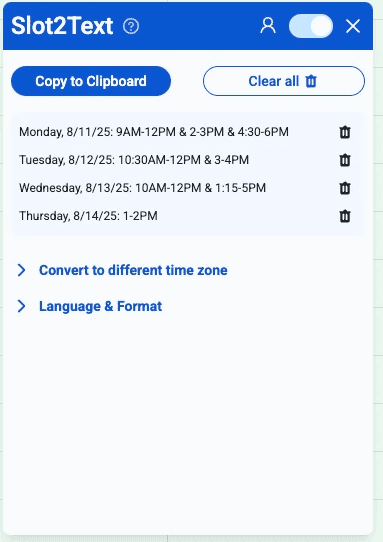
(Convert) & Copy your time slots.
Several time formats, all time zones.

“Before Slot2Text, I spent 20-30 minutes a day typing out time options.
I manage the calendars of five executives. With Slot2Text, I just click once and have the perfect suggestions ready to paste into an email. It saves me hours every week and makes our whole team more responsive. I also love that Slot2Text has a time conversion feature."
Vanessa, Executive Assistant
“More personal than a scheduling link. More efficient than typing slots manually.
While scheduling links can feel impersonal - as if you’re asking the other person to do the work - offering time slots is a subtle sign of respect. It communicates: ‘I’ve checked my calendar for you, here are times that work, and I care about making it easy for you."
John, HR Manager

Google Verified & Google Featured
See Plans“This tool transforms a previously slow and error-prone task into a process that takes just seconds - saving valuable time (and nerves!) every single day.
As a Business Development Representative, I used to spend way too much time typing out time slots for meetings. I thought: there must be a faster way. That frustration led me to build Slot2Text - a simple tool that pulls my free slots from Google Calendar and converts them into text instantly. Now I save time every single day and focus on what really matters: having real conversations with prospects."
Henrik Behlert, Business Development Rep & Founder of Slot2Text
Slot2Text - The Chrome Extension
for Faster Scheduling
Tired of wasting time typing out your availabilities?
With Slot2Text you can instantly convert your free time slots in Google Calendar into plain text. This simple yet powerful Chrome Extension helps sales reps, virtual assistants, and busy professionals save valuable minutes every day by making scheduling and availability sharing effortless.


How It Works
- Highlight your free time slots directly in Google Calendar.
- Slot2Text automatically transforms them into clean text.
- Convert into another timezone or adapt format
- Copy & paste into any email, chat, or message.
- No more errors, switching tabs or typing out times manually.
Why Choose Slot2Text?
— Boost Productivity: Cut down the time spent on scheduling.
— Simple & Secure: The extension only reads highlighted slots.
— Perfect for Professionals: Fast and frustration-free.
— Affordable Plans: Start with a free trial & choose your plan!
Get Started in Seconds: Slot2Text is lightweight, easy to install, and runs directly in your browser. No complicated setup, no extra apps – just faster scheduling with one click.

Pricing
Base - Slot2Text
$2.99 billed annually
or $3.99 billed monthly
(incl. VAT)
- Mark time slots in seconds
- Auto-writes chosen slots
- Choose from range of date formats
- Copy to clipboard
Pro - Slot2Text & Convert
$3.99 billed annually
or $4.99 billed monthly
(incl. VAT)
- Mark time slots in seconds
- Auto-writes chosen slots
- Choose from range of date formats
- Copy to clipboard
- Convert time slots into all time zones worldwide
Team - Slot2Text & Convert
$3.99 billed annually
or $4.99 billed monthly
(incl. VAT)
- Mark time slots in seconds
- Auto-writes chosen slots
- Choose from range of date formats
- Copy to clipboard
- Convert time slots into all time zones worldwide
- Assign seats to your team via email
When clicking "Sign Up", you'll be forwarded to our plans & check-out page.
Convert Google Calendar Availability to Text and Share It Instantly
Stop manually typing your availability.
Slot2Text converts your Google Calendar free slots into ready-to-send text for emails, LinkedIn messages, and chats.
The Problem
Sharing calendar availability is still surprisingly manual
When scheduling meetings, most people still copy time slots by hand:
“I’m free Tuesday 10–12 or Thursday 2–4…”
This process is:
- time-consuming
- error-prone
- repetitive
Google Calendar doesn’t offer a fast way to convert availability into text.
That’s exactly where Slot2Text helps.
The Solution
Turn Google Calendar availability into clean text in one click
Slot2Text is a lightweight Chrome extension that lets you:
- pick free time slots from Google Calendar
- instantly convert them into readable text
- paste them directly into emails or messages
No links. No back-and-forth. No manual typing.
How Slot2Text Works
Share availability from Google Calendar in seconds
- Open Google Calendar
- Select your available time slots
- Copy the generated text
- Paste it into your email or message
That’s it.
Key Features
Designed for fast meeting scheduling
- Convert calendar availability to text
- Share availability via email, LinkedIn, or chat
- Works directly inside Google Calendar
- Clean, professional formatting
- Optional time zone conversion
- Built for speed and daily use
Who Slot2Text Is For
Built for professionals who schedule meetings daily
Slot2Text is ideal for:
- Sales Development Representatives (SDRs / BDRs)
- Recruiters & Talent teams
- Executive & Virtual Assistants
- Founders & consultants
If you regularly propose meeting times by email, Slot2Text saves you time every single day.
Why Not Just Send a Calendar Link?
Text beats links in many real-world scenarios
Calendar links are not always ideal:
- some recipients don’t click links
- some companies block scheduling tools
- quick emails often just need text
Slot2Text gives you full control - send availability exactly how and where you want.
Chrome Extension for Google Calendar
Simple, fast, and privacy-friendly
Slot2Text runs locally as a Chrome extension and only works when you actively use it.
No tracking. No clutter. Just a faster way to share availability.
Stop typing your availability manually.
Install Slot2Text and turn your Google Calendar availability into text - instantly.
FAQ
How do I mark slots?
What languages do you support?
Is there a free trial?
How this project was built
Website: Cloudflare
Reporting: Windsor
Demo Video: Cursorful